CBC Setups
Cannabis Business Central requires setups to be completed to use CBC features. The following sections cover the various areas of the system where these setups reside.
For first time setup in a new company, there is a function on the Cannabis Business Central Setup page called Insert Default Data.

This function will create some of the generic CBC Setups such as the CBC Number Series, Cannabis Report Selections, Reclass Journal and Batch as well as Source Codes. By inserting default data in an existing company, the program will override the existing data. Setups in the following sections will still need to be completed to configure the module based on the company’s specific requirements.
Cannabis Business Central Setup
Click the magnifying glass and in the search box, type in Cannabis Business Central Setup.
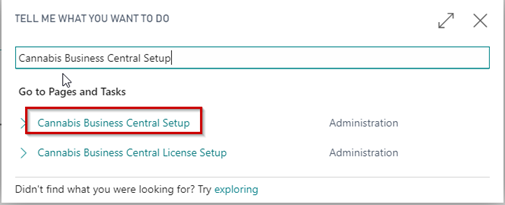
The first page that comes up is the Cannabis Business Central Setup list page.
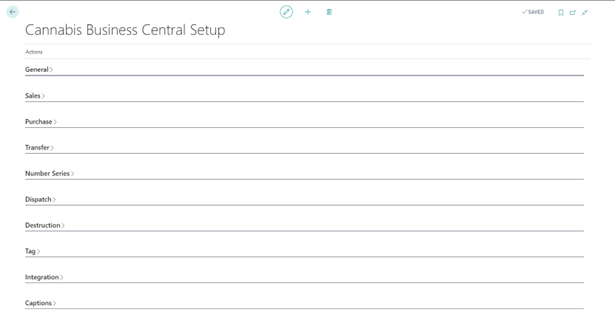
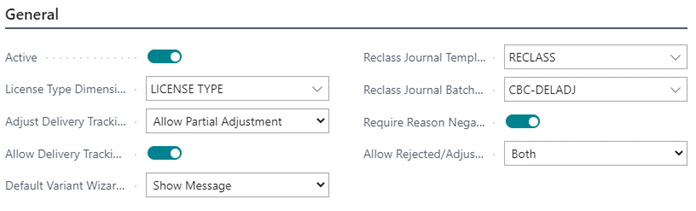
General FastTab
| FIELD NAME | FUNCTION |
|---|---|
| Active | Enables/Disables CBC |
| License Type Dimension Code | The equivalent dimension designated by the system for license types. This creates the corresponding Dimension value for each License Type Code created. |
| Adjust Delivery Tracking |
Note: Reject in Full will not allow the user to make partial adjustments, only full rejections. |
| Allow Delivery Tracking Adjust Lot Split | Toggle field to allow for the partial delivery/rejection of a CBC tag during an inventory movement where product delivery tracking is used. If this feature is enabled, the end user can reject a partial quantity of a CBC tag, while the remaining amount is posted to the destination. Note: This feature should not be enabled in a jurisdiction where Metrc is used, or BC is integrated with, as partial tags cannot be moved. In this circumstance, with this setting toggled OFF, an end user must either accept or reject the given line in full. |
| Google Directions API Key | The application programming interface key that allows communication with Google Services and their integrations. The API that SilverLeaf CBC connects to is Metrc Integration. |
| Default Variant Wizard SKU | Upon assignment of variants to items, the program will display an optional prompt to create Stock keeping Units (SKUs), skip SKUs or show message. |
| Reclass Journal Template Name | The reclass journal template name for CBC tag reclassification. |
| Reclass Journal Batch Name | The reclass journal batch name for CBC tag reclassification. |
| Require Negative Item Adjustment | The reclass journal batch name for CBC tag reclassification. |
| Require Negative Item Adjustment | Toggle field for the program to require a Reason Code for a negative adjustment. Note: Reason Codes flow through to Value and General Ledger entries only. |
| Allow Rejected/Adjusted Inventory Return To | Specifies where rejected or adjusted inventory can be returned to:
|
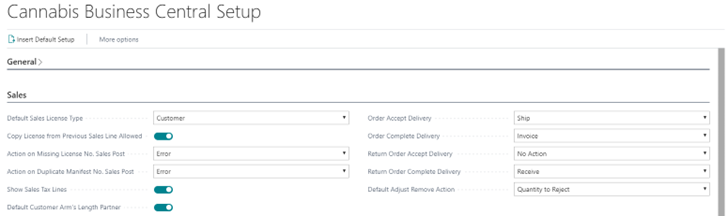
Sales FastTab
| FIELD NAME | FUNCTION |
|---|---|
| Default Sales License Type | The user can choose where the check for a valid license will be based on the License Type assigned to the Item or the License Type assigned to the Customer – by determining the License Type code value that will be populated on the sales line. |
| Copy License from Previous Sales Line Allowed | If field is enabled, the program will generate and store the license from the previous sales line within a sales document. |
| Action on Missing License No. Sales Post | Program-generated error or warning when there is no applicable license within a sales document on post. |
| Action on Duplicate Manifest No. Sales Post | Program-generated error or warning when the manifest number is duplicated. |
| Show Sales Tax Lines | Toggle field to show excise and cultivation tax on sales lines. |
| Default Customer Arm’s Length Partner | Toggle field for a customer to be considered an Arm’s Length Partner by default for California excise tax regulation, which will then be inherited on subsequent sales documents. |
| Order Accept Delivery | Choose the posting action when performing the “Accept Delivery” function in Delivery Tracking:
|
| Return Order Accept Delivery | Choose the posting action when performing the “Accept Delivery” function in Delivery Tracking:
|
| Return Order Complete Delivery | Specifies what function will be run upon delivery acceptance:
|
| Default Adjust Remove Action | Upon delivery adjustments, the program will auto-populate either Quantity to Reject or will leave the field Blank. |
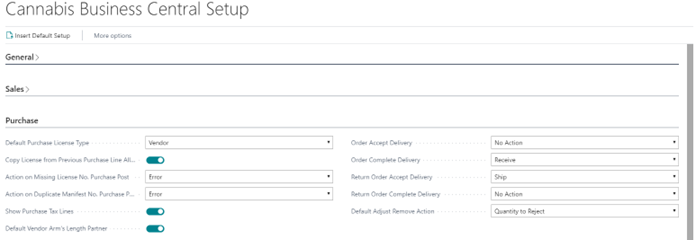
Purchase FastTab
| FIELD NAME | FUNCTION |
|---|---|
| Default Purchase License Type | The user can choose where the check for a valid license will be based on the License Type assigned to the Item or the License Type assigned to the Vendor - by determining the License Type code value that will be populated on the purchase line. |
| Copy License from Previous Purchase Line Allowed | If field is enabled, the program will generate and store the license from the previous purchase line within a purchase document. |
| Action on Missing License No. Purchase Post | Program-generated error or warning when there is no applicable license within a purchase document on post. |
| Action on Duplicate Manifest No. Purchase Post | Program-generated error or warning when the manifest number is duplicated. |
| Show Purchase Tax Lines | Toggle field to show excise and cultivation tax on purchase lines. |
| Default Vendor Arm’s Length Partner | Toggle field for a customer record to be created as an Arm’s Length Partner for California excise tax regulation, which will then be inherited on subsequent purchase documents. |
| Order Accept Delivery | Choose the posting action when performing the “Accept Delivery” function in Delivery Tracking:
|
| Return Order Accept Delivery | Choose the posting action when performing the “Accept Delivery” function in Delivery Tracking:
|
| Return Order Complete Delivery | Specifies what function will be run upon delivery acceptance:
|
| RoDefault Adjust Remove Action | Upon delivery adjustments, the program will either auto-populate Quantity to Reject or will leave the field Blank. |
Transfer FastTab
| FIELD NAME | FUNCTION |
|---|---|
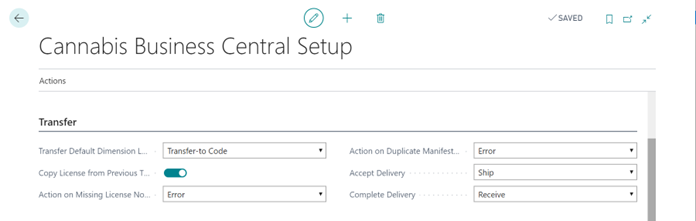
| Transfer Default Dimension Location | Choose whether Dimensions will be populated from the Transfer Order from the Transfer-To or Transfer-From Location Code Default Dimensions. |
| Copy License from Previous Transfer Line Allowed | If field is enabled, the program will generate and store the license from the previous transfer line within a transfer document. |
| Action on Missing License No. Transfer Post | Program-generated error or warning when there is no applicable license within a transfer document on post. |
| Action on Duplicate Manifest No. Transfer Post | Program-generated error or warning when the manifest number is duplicated. |
| Accept Delivery | Choose the posting action when performing the “Accept Delivery” function in Delivery Tracking:
|
| Complete Delivery | Choose the posting action when performing the “Complete Order” function in Delivery Tracking:
|
Number Series FastTab
| FIELD NAME | FUNCTION |
|---|---|
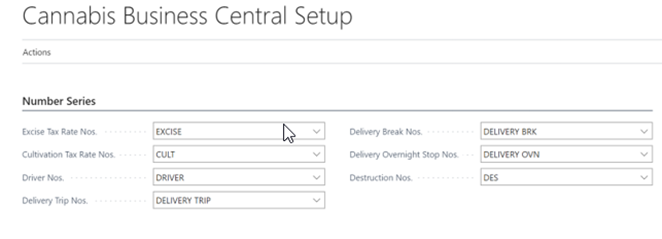
| Excise Tax Rate Nos. | Assigned number series for excise tax. |
| Cultivation Tax Rate Nos. | Assigned number series for cultivation tax. |
| Driver Nos. | Assigned number series for drivers. |
| Delivery Trip Nos. | Assigned number series for delivery trips. |
| Delivery Break Nos. | Assigned number series for delivery breaks. |
| Delivery Overnight Stop Nos. | Assigned number series for delivery overnight stops. |
| Row |
Dispatch FastTab
| FIELD NAME | FUNCTION |
|---|---|
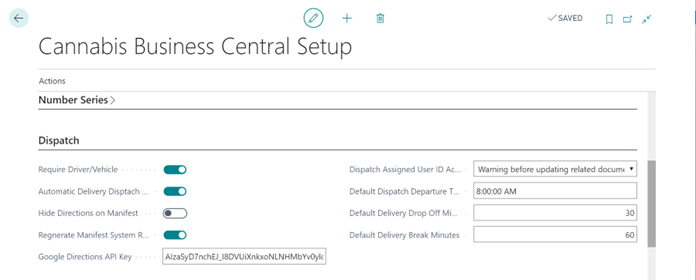
| No. of Drivers Required | Select the number of drivers required when processing delivery tracking |
| Driver Signature Optional | Toggle field if signature is not required. |
| Automatic Delivery Dispatch Time Update | Toggle field to automate time and generation of subsequent stops. |
| Hide Directions on Manifest | Toggle field to hide the directions on manifests. |
| Regenerate Manifest System Route | Toggle field to regenerate a delivery manifest route previously used. |
| Google API Version | Specifies which version of the Google API is used for directions. |
| Google Directions API Key | The application programming interface key that allows communication with Google Services and their integrations. API keys can be setup and generated here. |
| Dispatch Assigned User ID Action |
|
| Default Dispatch Departure Time | The time defaulted by the program for delivery trip departure times. |
| Default Delivery Drop Off Minutes | The time defaulted by the program to allow for the product delivery. |
| Default Delivery Break Minutes | The time defaulted by the program to allow for scheduled driver breaks between deliveries. |
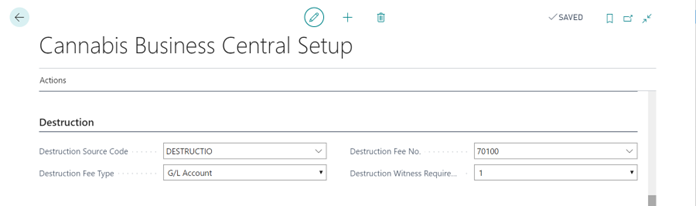
Destruction FastTab
| FIELD NAME | FUNCTION |
|---|---|
| Destruction Source Code | The source code that will be assigned to destruction documents. |
| Destruction Fee Type | The fee will be listed as either a G/L Account or service item within the associated destruction document. |
| Destruction Fee No. | If Destruction Fee Type field equals:
|
| Destruction Witness Requirement | The number of witnesses required for sign-off on the destruction document. |
| Destruction Quarantine Duration | The number hours material needs to be quarantined before it can be destroyed. |
Tag FastTab
| FIELD NAME | FUNCTION |
|---|---|
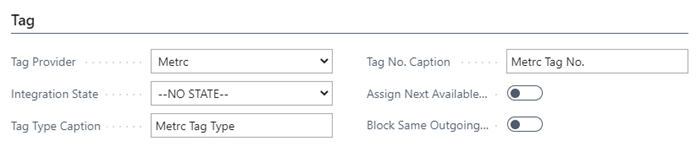
| Tag Provider | Provider of state regulated track and trace system. Choices are:
|
| Integration State | The state that is integrated with the track and trace functionality. Default is No State. Note: Not functional without integration. |
| Tag Type Caption | Caption field. User-defined. |
| Tag No. Caption | Caption field. User-defined. |
| Assign Next Available Tag on Assign Lot | When using the Assign Lot function, the system will automatically assign CBC Tags based on the next available tag . |
| Block Same Outgoing Tag to Licensee | Blocks shipping the same CBC Tag twice |
Integration FastTab
| FIELD NAME | FUNCTION |
|---|---|
| Trace and Trace Active | Toggle field for track and trace integration in BC. |
| Enable State Integration | Toggle field for track and trace integration with the outside state system. |
| Integration API Key | The application programming interface key that allows communication with track and trace provider and their integrations. |
| Integration API URL | The URL of track and trace provider. |
| Track & Trace Void Sample Reason Code | The default reason code to apply when voiding samples. |
Captions FastTab
| FIELD NAME | FUNCTION |
|---|---|
| CBC Header Text 1 Caption | User-defined text field. Flows to Sales Document headers, Posted Sales Documents and Delivery Trips. |
| CBC Header Text 2 Caption | User-defined text field. Flows to Sales Document headers, Posted Sales Documents and Delivery Trips. |
