Track & Trace Product Categories
Metrc categorizes its Products by Category and Sub Category. The Sub Category a Product belongs to drives what information must be captured when new Products are created. The Track and Trace Product Category page pulls in the categories set up in the State Track and Trace system so that they can be set up on the Item Card to classify inventory.
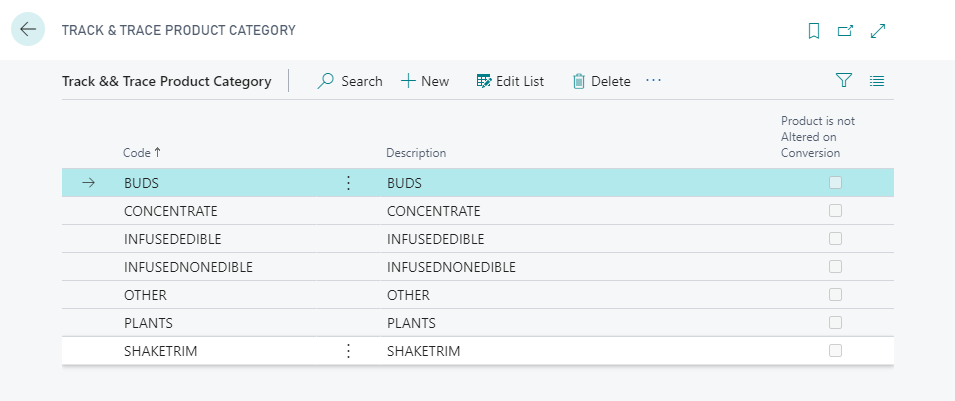
Track & Trace Product Category Functions
| FIELD NAME | FUNCTION |
|---|---|
| Download Categories… | Creates the Product Categories and Subcategories from the State Track and Trace system. |
| Sub Category | Displays the Sub Categories of the selected Product Category. |

The Download Categories function automatically downloads the related Sub Categories from the State Track and Trace system. These Sub Categories can be reviewed by selecting the Sub Category button on Action pane:

Track & Trace Product Sub Category
| FIELD NAME | FUNCTION |
|---|---|
| Requires Strain | Determines if inventory with this sub category requires Strains to post transactions. This field is downloaded with the Sub Category from Metrc. |
| Requires Volume | Determines if inventory with this sub category requires Volume to post transactions. This field is downloaded with the Sub Category from Metrc. |
| Requires Unit Weight | Determines if inventory with this sub category requires Unit Weight to post transactions. This field is downloaded with the Sub Category from Metrc. |
| Requires Serving Size | Determines if inventory with this sub category requires Serving Size to post transactions. This field is downloaded with the Sub Category from Metrc. |
| Requires Serving Size Duration | Determines if inventory with this sub category requires Serving Size Duration to post transactions. This field is downloaded with the Sub Category from Metrc. |
| Requires Serving Size Per Unit | Determines if inventory with this sub category requires Serving Size Per Unit to post transactions. This field is downloaded with the Sub Category from Metrc. |
| Requires Item Brand | Determines if inventory with this sub category requires Item Brand to post transactions. This field is downloaded with the Sub Category from Metrc. |
| Requires THC Percent | Determines if inventory with this sub category requires THC Percent to post transactions. This field is downloaded with the Sub Category from Metrc. |
| Requires THC Content | Determines if inventory with this sub category requires THC Content to post transactions. This field is downloaded with the Sub Category from Metrc. |
| Requires THC Content Dose | Determines if inventory with this sub category requires THC Content Dose to post transactions. This field is downloaded with the Sub Category from Metrc. |
| Requires CBD Percent | Determines if inventory with this sub category requires CBD Percent to post transactions. This field is downloaded with the Sub Category from Metrc. |
| Requires CBD Content | Determines if inventory with this sub category requires CBD Content to post transactions. This field is downloaded with the Sub Category from Metrc. |
| Requires CBD Content Dose | Determines if inventory with this sub category requires CBD Content Dose to post transactions. This field is downloaded with the Sub Category from Metrc. |
| Requires Description | Determines if inventory with this sub category requires Description to post transactions. This field is downloaded with the Sub Category from Metrc. |
| Requires Public Ingredients | Determines if inventory with this sub category requires Public ingredients to post transactions. This field is downloaded with the Sub Category from Metrc. |
| Requires Product Photos | Determines if inventory with this sub category requires Product Photos to post transactions. This field is downloaded with the Sub Category from Metrc. |
| Requires Packaging Photos | Determines if inventory with this sub category requires Packaging Photos to post transactions. This field is downloaded with the Sub Category from Metrc. |
| Requires Label Photos | Determines if inventory with this sub category requires Label Photos to post transactions. This field is downloaded with the Sub Category from Metrc. |
| Requires Supply Duration Days | Determines if inventory with this sub category requires Supply Duration Days to post transactions. |
| Requires Admin Method | Determines if inventory with this sub category requires Admin Method to post transactions. |
| Requires Allergens | Determines if inventory with this sub category requires a list of Allergens to post transactions. |
| Skip Output Overage Check | Determines if inventory with this sub category can output overage when creating inventory. |
| Is Finished Good | Determines if inventory with this sub category is classified as a finished good. |