Cannabis Business Central Setup
Track and Trace is an add-on to CBC functionality. Once installed, several new set ups will need to be completed on the Cannabis Business Central (CBC) Setup page.
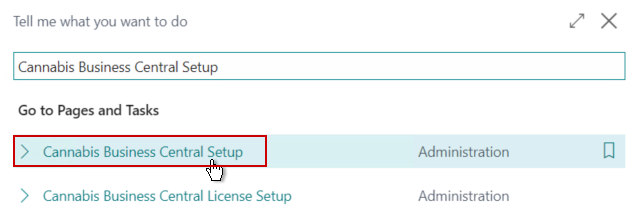
Click the magnifying glass and in the search box, type in Cannabis Business Central Setup and select the related link.
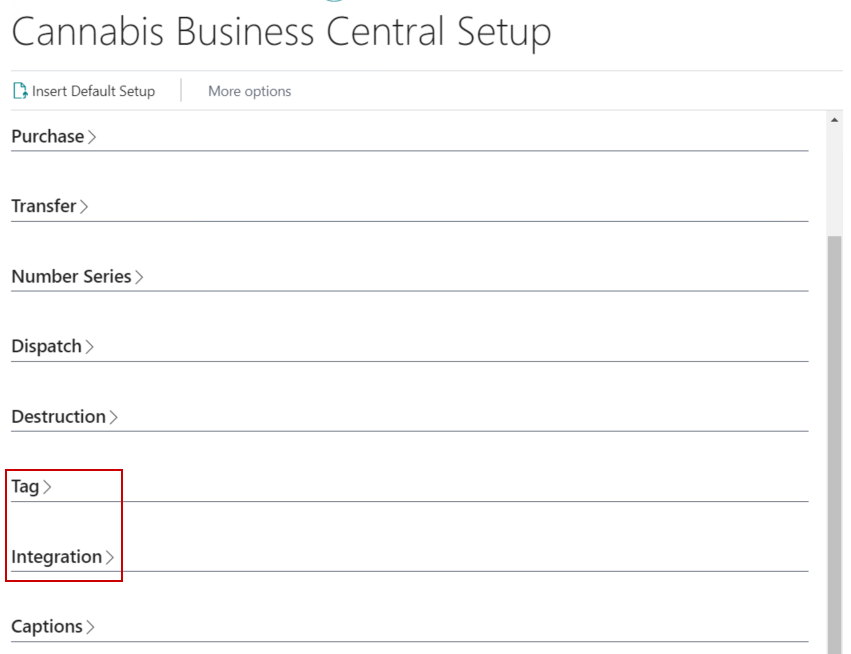
Tag FastTab
| FIELD NAME | FUNCTION |
|---|---|
| Tag Provider | Provider of state regulated Track and Trace system. The Metrc option should be selected for the Metrc integration. |
| Integration State | The state that is integrated with the Track and Trace functionality. The state the company is operating in should be selected. |
| Tag Type Caption | Caption field. User-defined e.g., Metrc Tag Type. |
| Tag No. Caption | Caption field. User-defined e.g., Metrc Tag No. |
| Assign Next Available Tag on Assign Lot | When using the Assign Lot function, the system will automatically assign CBC Tags based on the next available Tag. This should be used only when integrating with Leaf. |
| Block Same Outgoing Tag to Licensee | Blocks shipping the same CBC Tag twice to the same License. |
| Require Company Tag Type | Requires a Tag Type when creating new Tags. |
| Prevent Partial Tags | The following options can be selected for how the system should behave if a user attempts to ship a partial Tag quantity:
|
| Package Tag Type | The Tag Type to use when downloading unused Tags out of Metrc. |

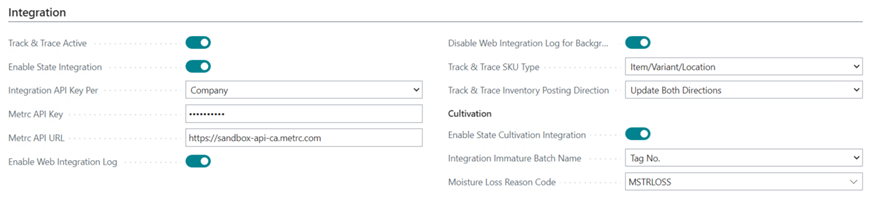
Integration FastTab
| FIELD NAME | FUNCTION |
|---|---|
| Track & Trace Active | Toggle field for Track and Trace integration in Business Central. This will have the Track and Trace fields display within Business Central - not communicate with Metrc. |
| Enable State Integration | Toggle field for Track and Trace integration with the outside state system. This will have Business Central communicate with Metrc for non-Cultivation transactions. |
| Integration API Key Per | Specifies if the Integration API Key will be setup per Company or per User.
|
| Integration API Key | The Application Programming Interface (API) Key that allows communication with Track and Trace provider and their integrations. |
| Integration API URL | The URL of Track and Trace provider. |
| Enable Web Integration Log | Toggle field to keep a log of integration entries in the Web Integration Logs page. |
| Disable Web Integration Background Client | When toggled, only user created logs will be stored in the Web Integration Logs. This can be used to reduce the amount of data stored in the logs and reduce potential performance issues from the background processes. |
| Track & Trace SKU Type | Specifies how to send SKU information to the Track and Trace system:
|
| Track & Trace Inventory Posting Direction | Specifies the automation of Inventory posting with the integration:
|
| Send Track & Trace Calls | Hidden field. Should be set to After Posting when integrating with Metrc. |
| Download Track & Trace Lab Results | Toggle field to download lab results with Track & Trace Transfers. Should only be toggled on if integrating to post against QC Documents. |
| Enable State Cultivation Integration | Toggle field for Track and Trace integration with the outside state system. This will have BC communicate with Metrc for cultivation transactions. The Metrc Cultivation Integration is an additional installation from base Track and Trace. |
| Integration Immature Batch Name | Specifies how to send Plant Batch Names to Metrc. Options are:
|
| Moisture Loss Reason Code | Specifies the Reason Code to send to Metrc when there is Moisture Loss on Harvest adjustments. |