Track & Trace - Item Card
The Item Card contains product information. Usually, items are set up to represent a product without attaching a strain. For example, an item called 7g Flower is configured. Then, Variants are attached to the item to represent the different strains that will be used for that product. This keeps the item list shorter. However, users are not limited to this - they can create items that are strain specific if needed.
Cannabis FastTab
| FIELD NAME | FUNCTION |
|---|---|
| Product Conversion Item No. | The Item number to select as the Output Item when doing a Product Conversion. This is typically used when different Units of Measure are configured as different Products in Metrc. For example, if you have Buds that are Metrc Grams and Buds that are Metrc Pounds. |
| Supply Duration Days | Specify the Supply Duration Days. |
| Useable Cannabis Material Unit of Measure | The Unit of Measure of the Item's usable cannabis material. |
| Serving Size | Specify the Serving Size. |
| Administration Method | Specify how to intake the item. |
| THC Percent | Specify the THC Percentage. |
| THC Content | Specify the THC Content. |
| THC Content Unit of Measure | Specify the THC Content Unit of Measure. |
| THC Content Dose | Specify the Content Dosage. |
| THC Content Dose Unit of Measure | Specify the Content Dosage Unit of Measure. |
| CBD Percent | Specify the CBD Percentage. |
| CBD Content | Specify the CBD Content. |
| CBD Content Unit of Measure | Specify the CBD Content Unit of Measure. |
| CBD Content Dose | Specify the Content Dosage. |
| CBD Content Dose Unit of Measure | Specify the Content Dosage Unit of Measure. |
| Cannabis Ingredients Code | Specify the Cannabis Ingredients Code that describes the item's ingredients. |
| Allergens | Specify any allergens in the product. |
Track & Trace FastTab
| FIELD NAME | FUNCTION |
|---|---|
| Enabled | Toggle on to integrate with Metrc. |
| Category | The category to use in Metrc. These are downloaded out of Metrc from the Track & Trace Product Category page. |
| Sub Category | The Sub Category to use in Metrc. These are downloaded out of Metrc from the Track & Trace Product Category page. |
| Item Brand | The Item Brand to use in Metrc. These are downloaded out of Metrc from the Track & Trace Item Brands page. |
| Override SKU Type | If this item needs to use a different SKU combination than what is configured in the Track & Trace SKU Type field on the Cannabis Business Central Setup page, the appropriate combination can be selected here. Options are:
|
| Synchronized | System field that is toggled on when all the Track & Trace SKUs for an item are synchronized with Metrc. |
| Use Useable Conversion | Allows for a different Unit of Measure in Business Central than Metrc. Toggling on will use the Useable Cannabis Unit of Measure set on the Cannabis FastTab instead of the Base Unit of Measure. |
| Production Batch | Defaults the Production Batch boolean in Metrc when output with a Production Order, Conversion, or Harvest in Business Central. |
Item Attachments
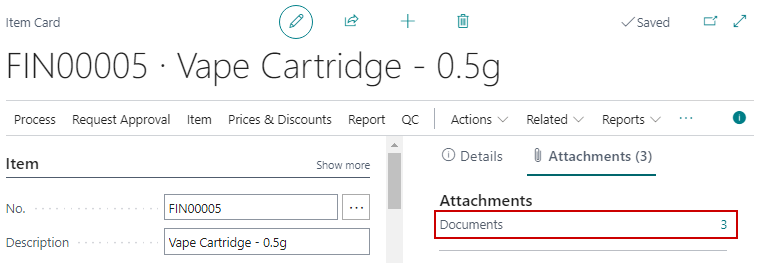
If photos are required for product creation they can be attached on the Attachments Factbox on the Item Card:
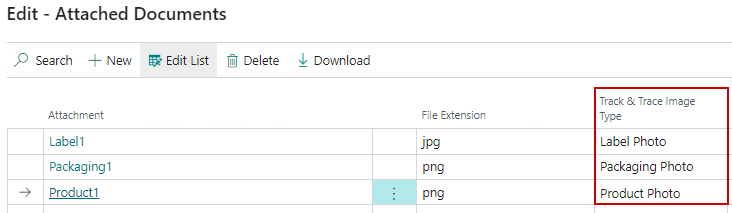
In order for the photos to send to Metrc the Track & Trace Image Type must be selected:
Item Functions
| FIELD NAME | FUNCTION |
|---|---|
| Create Track & Trace Product | Creates Products in Metrc for any Track and Trace SKU in Business Central that are not already synchronized with Metrc. |
| Update Track & Trace Product | Pushes any modifications from the Item, Variant or Location to the Metrc. |
| Delete Track & Trace Product | Deletes all Products out of Metrc tied to Track and Trace SKUs that have not been used. |
