Track & Trace SKU's
Products in Metrc have a License and Strain attached to them. In Business Central, the License is represented as the Location and the Strain can be represented as a Variant. However, neither of these pieces of information is directly attached to the Item in Business Central like it is in Metrc. The Track and Trace SKUs list serves to link an Item in Business Central to the product in Metrc by attaching the Location and/or Strain to an Item No.
Track & Trace SKUs are created based on the Track & Trace SKU Type option selected on the CBC Setup page. The default can be overridden on the Item level by selecting a Track & Trace Override SKU Type option. The two options to create Track & Trace SKUs are:
• Item/Location: This should be used if the Item Card in Business Central is Strain specific.
• Item/Variant/Location - this should be used in the Item Card in Business Central is generic to the Product and Strains will be attached as Variants.
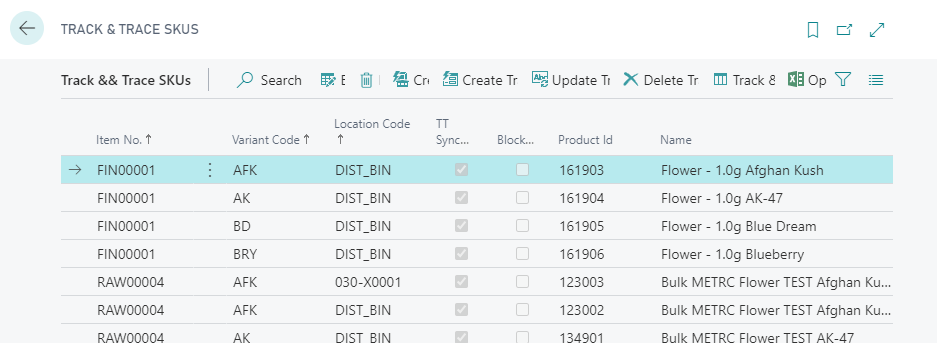
See How To: Create a SKU and Product in METRC Using Create SKU and How To: Map SKU to an Existing METRC Product for step-by-step instructions.
Track & Trace SKU Functions
| FIELD NAME | FUNCTION |
|---|---|
| Create SKUs | Used to manually create a SKU combination based on the Track & Trace SKU Type option selected in CBC Setup. The combination can be overridden by selecting a Track & Trace Override SKU Type on the Item Card. If Auto-Create SKUs is selected on the Variant and Locations, SKUs will be created automatically. |
| Create Track & Trace Product… | Creates the Product in Metrc. The Product Id, Name, and TT Synchronized fields will be populated once created. |
| Update Track & Trace Product… | Pushes any changes made to the Item, Variant, and/or Location to the Product in Metrc. |
| Delete Track & Trace Product… | Deletes the Product in Metrc. This can only be done if it has not been used. |
| Track and Trace Products | Displays the Track & Trace Product attached to the SKU. |
